Posts

Showing posts with the label tech

Dev: Lambert 93 / Latitude et Longitude

Parfois les données sur la  plateforme ouverte des données publiques françaises , quand il s'agit des coordonnées géographiques, sont publiées dans le système de coordonnées Lambert 93 . Pour utiliser ces données sur une carte comme Leaflet il faut convertir les coordonnées en Latitude et Longitude ou le système WGS84 - World Geodetic System 1984, utilisé pas le GPS. Pour cela le plus simple c'est d'utiliser PROJ  ou un de ports existants comme https://github.com/proj4js/proj4js en JavaScript. Si les fichiers sont fournis avec le ficher prj , le mieux c'est d'utiliser cette chaine de caractères qui défini la projection en tant d'un paramètre d'entrée et le système WGS84 comme paramètre de sortie: var fromProjection = 'PROJCS["RGF_1993_CC49",GEOGCS["GCS_RGF_1993",DATUM["D_RGF_1993",SPHEROID["GRS_1980",6378137.0,298.257222101]],PRIMEM["Greenwich",0.0],UNIT["Degree",0.0174532925199433]],PROJE...
Dev: PlantUML + VS Code + GitLab

Image
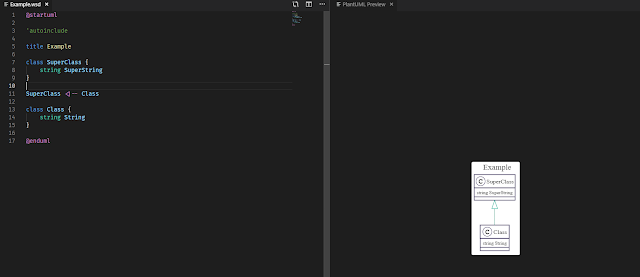
I was looking for a way to share some details of implementation with my colleagues and in the same time to have it as a documentation on which we could collaborate and evolve it. It also should have been visual to have a better understating on composition. I could of course draw it from scratch using any existing drawing tool, but since I had quite a lot of types to put on, I gave up on the idea of never-ending copy/pasting from code to the diagram. Fortunately, one of my colleagues suggested me to try PlantUML . I gave it a try using an online editor and was surprised by the efficiency and the speed my diagram started to get in shape. It's much more easier to write a text and the syntax is very intuitive, so why bother with drawing and aligning those boxes while you can just leave it on PlantUML? We did a quick additional research and found that there is also a neat VS Code Extension that allows to have a preview on every update. So the next target was to automate the gen...

Issue: SVN + CruiseControl.NET + Server certificate verification failed

Hi, I'd like to be very short on this tech things. :) Issue ThoughtWorks.CruiseControl.Core.CruiseControlException: Source control operation failed: svn: OPTIONS of 'https://host/svn/': Server certificate verification failed: certificate issued for a different hostname, issuer is not trusted (https://host) Why? Because of this . Fix Basically I didn't want to change anything in the certificate. And there is no possibility to add custom command line options to the Subversion Control Block of the CC.NET. :( So the idea came up fast... use old school batch files. First of all read this blog post on how to run CMD.EXE under the Local System account (CC.NET runs under it usually). Then read this to find out how to save configuration locally. And finally create a .bat file with the line: @"%SVNPath%\svn.exe" --config-dir=C:\whatever %* and put the path into the Subversion Control Block of the CC.NET's config file: < executable > %SVNPath%\run.bat < /...