Posts

Showing posts with the label howto

Dev: Lambert 93 / Latitude et Longitude

Parfois les données sur la  plateforme ouverte des données publiques françaises , quand il s'agit des coordonnées géographiques, sont publiées dans le système de coordonnées Lambert 93 . Pour utiliser ces données sur une carte comme Leaflet il faut convertir les coordonnées en Latitude et Longitude ou le système WGS84 - World Geodetic System 1984, utilisé pas le GPS. Pour cela le plus simple c'est d'utiliser PROJ  ou un de ports existants comme https://github.com/proj4js/proj4js en JavaScript. Si les fichiers sont fournis avec le ficher prj , le mieux c'est d'utiliser cette chaine de caractères qui défini la projection en tant d'un paramètre d'entrée et le système WGS84 comme paramètre de sortie: var fromProjection = 'PROJCS["RGF_1993_CC49",GEOGCS["GCS_RGF_1993",DATUM["D_RGF_1993",SPHEROID["GRS_1980",6378137.0,298.257222101]],PRIMEM["Greenwich",0.0],UNIT["Degree",0.0174532925199433]],PROJE...
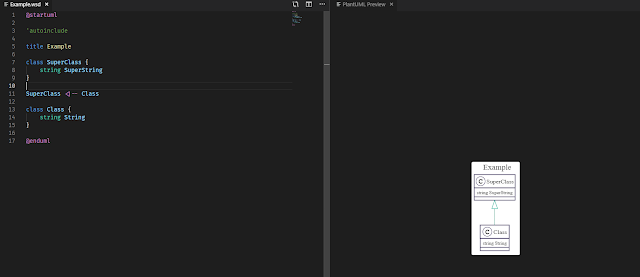
Dev: PlantUML + VS Code + GitLab

Image
I was looking for a way to share some details of implementation with my colleagues and in the same time to have it as a documentation on which we could collaborate and evolve it. It also should have been visual to have a better understating on composition. I could of course draw it from scratch using any existing drawing tool, but since I had quite a lot of types to put on, I gave up on the idea of never-ending copy/pasting from code to the diagram. Fortunately, one of my colleagues suggested me to try PlantUML . I gave it a try using an online editor and was surprised by the efficiency and the speed my diagram started to get in shape. It's much more easier to write a text and the syntax is very intuitive, so why bother with drawing and aligning those boxes while you can just leave it on PlantUML? We did a quick additional research and found that there is also a neat VS Code Extension that allows to have a preview on every update. So the next target was to automate the gen...

How-To: Install node.js on Amazon AMI Linux (EC2)

I was looking on how to install node.js on an EC2 instance running Amazon AMI Linux via a package manager. Since Amazon AMI Linux is based on RHEL and it is a sort of a minimal/basic install of Red Hat Enterprise Linux it is possible install node.js using yum .  Just run: sudo yum install nodejs npm --enablerepo=epel Please note that in order to update node you should also use --enablerepo=epel . You may also permanently enable EPEL repository by modifying /etc/yum.repos.d/epel.repo . Under [epel] section, replace enabled=0 by enabled=1 .